Your download has started
VAIA for Windows is downloading now. Didn't start? Download manually.
Next steps
- Run the installer you just downloaded.
- Create your account in the app.
- Your free trial starts in-app - no credit card required.
System requirements: Windows 10 or 11, 64-bit. Mac isn't supported yet - it's on the roadmap.
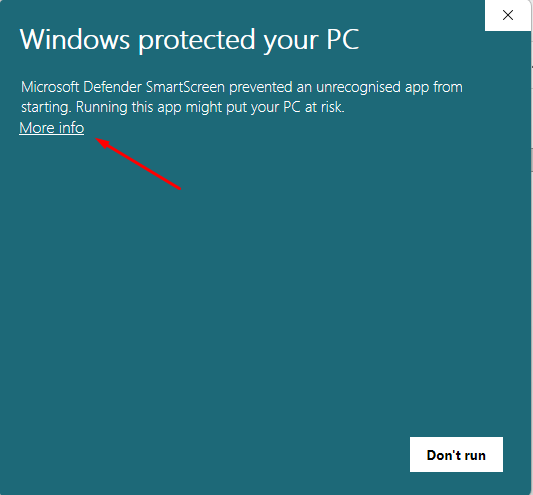
Windows shows a security warning when you open VAIA? That's normal for a newly released app - here's why, and how to continue safely.
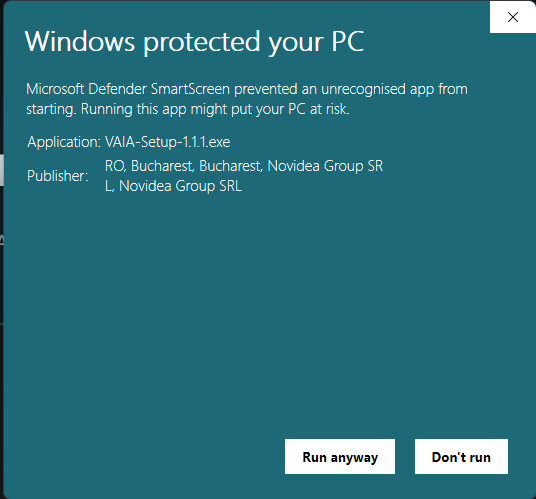
VAIA is digitally signed by Novidea Group SRL, and you can see that publisher name in the prompt itself. Microsoft Defender SmartScreen still shows this screen for newly released apps until enough people have downloaded them. It is not a virus warning, and it does not mean the app is unsafe. The prompt disappears on its own as VAIA becomes more widely used.
To continue:
- Click More info on the "Windows protected your PC" screen.
- Check that the publisher reads Novidea Group SRL.
- Click Run anyway to start the installer.